F
Frettly
macOS · 14.0.0+
Frettly - the interactive fretboard explorer and notebook
Frettly is a macOS application dedicated to enabling players of fretted instruments to visualise, experiment, and explore scales, modes and chords using a document based canvas.
Think of Frettly as Pages, not for text but for fretboards.
Frettly isn't just a scale and chord library - it's a persistent, document-based workspace designed by a player, for players. Whether you are composing a complex jazz piece, teaching a student, or exploring a new tuning on your banjo, Frettly organises your theory explorations into easily read, playable, shareable and saveable documents.
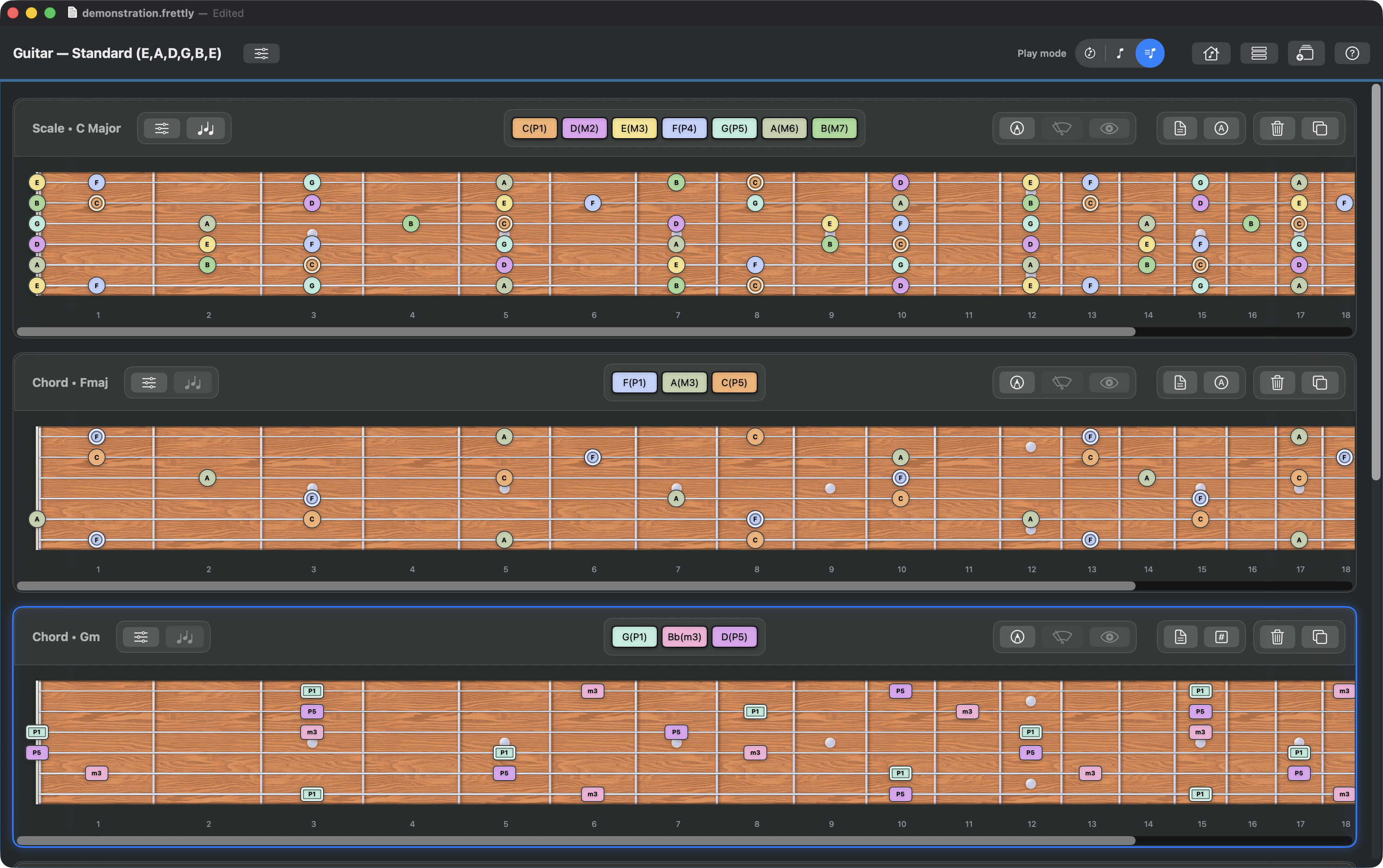
Supporting guitar, bass guitar, mandolin, banjo and ukulele, each document you create can show multiple scales/chords/modes for the document’s chosen instrument, and each instrument type supports multiple possible tunings.
The roadmap for future Frettly enhancements is brimming with features. If you have suggestions for features or improvements, need support or advice, contact us at:
hello@frettly.app
A document-based fretboard explorer and notebook
- Frettly documents are made of fretboard panels, each displaying a given scale, chord, or mode
- Save different documents for different learnings, projects or tunings
- Each document displays its fretboards in the context of the document's instrument/tuning/handedness
- Modify a document’s instrument/tuning/handedness at any time and all panels update to show that change
- Customise Frettly by selecting from a range of fretboard backgrounds and colour themes for notes
- Cut/Copy/Paste actions supported for all fretboard and document modifications
- Undo/Redo actions supported for all fretboard and document modifications
- Cut/Copy/Paste and fretboard drag and drop actions all work across as well as within documents
- Click any note or interval to hear the note singly, with sustain, or to hear the panel's pattern from that note, pitch-perfect and instrument-specific
- Zoom in and out of fretboards
- Arrange panels using a simple panel management dialog, or by drag-and-drop
- Occurrences of a pattern's note/intervals can be selectively hidden for focussed practise and learning
- Toggle the display of either notes or intervals
- Mark notes/intervals on frets to highlight them
- Toggle display between all notes or only marked notes
- Toggle display of a notepad per fretboard to record teaching notes or ideas